Try the Most Addicted Game - Real Rocket Racing 3d Game

Wednesday, September 14, 2016

iOS 10 Update - Best New Features

iOS 10 update comes with lot of new features. Lets see each one in detail.

Handy button to check all unread emails
There is a button on the bottom left of the Mail app in iOS 10 that lets you quickly check all unread emails. Also long press of the button leads to other filters. And also one more button added i.e unsubscribe which lets you to unsubscribe by tapping it from annoyed newsletters,etc.

Get back to the old home button
The new unlock feature in iOS 10 where  the user has to press the home button to unlock the device works very well with the latest releases of  Apple i.e., iPhone 7 and iPhone 7 Plus(which has a touch model button but actually it is not a button). Coming to the older devices this feature is less convenient. To restore the old home button: Settings > General > Accessibility > Home Button > turn on Rest Finger to Open

Hide photo albums
Photos app in iOS 10 has a very impressive feature, it identifies people and groups all the photos they are in. And if you want to hide someone’s pics just open the People album and tap Select on the top right and now select the pics you want to hide and tap the Hide on the bottom left. 

Contact name predictions
While sending  iMessage or text from email address or a number which is not in your address book, iOS 10 tries to predict who they are.

Assign default numbers, email address for contacts
In the Contacts app, if you open any contact, you will see four blue icons-  Text, Call, FaceTime, and Email. For example if any contact has more than one phone number or email address you can pick a default. To do that tap and hold those icons. After picking the default if you tap any of these icons it will directly mail, call or message the default contact number or email address you assigned.

Draw anything on photos
If you want to add any text or draw something funny on any photo iOS 10 has a feature called Markup.  Open any picture in the Photos app > tap the settings icon (next to the trash icon) > tap the three dots icon on the top left > tap Markup. Same feature available in iMessage. Tap the right arrow on the bottom left. This reveals the camera icon, so tap that. Now tap and hold any photo and then tap the Markup button on the bottom-left.

Close multiple tabs at once in Safari
To close the multiple tabs open in the Safari browser simply tap and hold the tab button on the bottom right then you will get an option in red to close all tabs at once.

Uninstall pre-loaded apps
Annoyed with the unwanted pre-installed apps such as Weather, Mail, Stocks? Now you can rid of them easily by deleting them like others apps you delete, But the thing is these apps are not really uninstalled from the system, only the icon is hidden. It means we won’t gain any storage space.

Disable read receipts
Not interested to send read receipts on iMessage, simply tap the i icon on the top right of any conversation and disable the send read receipts.

Recent badge in call logs
Suppose if some contact has multiple numbers and you forget the number which you want to call them on.  Tap the i button which is next to the contact then you see a Recent badge you have called recently to that number.

Decrease data consumption on iMessage
If you face a slow internet connection situation you can now send compressed images via iMessage. Go to Settings > Messages, scroll to the bottom and enable Low quality Image Mode.

No limit on tabs in Safari
On iOS 10 you can open unlimited tabs in Safari which there is limit of 36 tabs on iOS 9

Optimise Storage to save space on Apple Music & Automatic Downloads
This feature in iOS 10 automatically removes the songs you haven’t played much to free up the storage space. Go to Settings > Music > enable Optimise Storage. Other feature is Automatic Downloads- When you add songs to your library, Apple Music will automatically download those songs. Just go to Settings > Music > turn on Automatic Downloads.

Improved Dial Assist
Go to Settings > Phone > turn on Dial Assist. Now if you get any call from landline numbers, iOS 10 shows you which city and state the number belongs to. 

Bedtime
There is a new feature in Clock app in iOS 10 which is Bedtime. With this feature you can set a sleep and wake up time. It reminds your sleep on time and wakes you up with relaxing music.

Tuesday, September 13, 2016

Download Facebook Photos and Albums

Sharing photos on Facebook is easy. It's however not that convenient to download all your photos and albums. Don't worry, Facebook is not going to delete your photographs without permission. But it's always a good habit to back up these precious memories, just in case.
If you have got hundreds or thousands of photos on Facebook, it would be really time-consuming to download them one by one. Fortunately, AnySoftwareTools just posted an article that introduced four great tools to get the job done. The best part? All the tools are totally free, and they still work in 2016.

A quick recap of the article:

  • Odrive is the best app that syncs and organizes all of your Facebook photos.
  • Facebook itself has a feature that allows you to get a copy of all your Facebook information, including pictures.
  • IFTTT works nicely but only limited to new photos you upload or get tagged.
  • DownAlbum is a fantastic Chrome add-on that you can use to one-click download all your albums.


Check it out, you'll love the techniques for sure. Don't forget to make multiple copies of your photos and albums to an external hard drive, or online storage like Dropbox or Google Drive.

Credit to Jessica Carrell from AnySoftwareTools for contributing this tip.

Wednesday, August 24, 2016

Google Phones Are On The Way

With Android OS Google became the king in smartphone operating systems platform. Now Google is focusing on smartphone sector to show their image. Google is planning to release two variants of smartphones in next two months. Even though Google Nexus phones running in market they doesn't have any Google logo or Brand name on it. 
For the first time smartphones are coming with their own Google Brand name. Rumors saying that the screen size in between 5"-5.5" (inches), internal storage 35GB-128GB. Google phone comes with android new OS nougat. In this phones Google search has been replaced with Google Assistant. Need to see how these Google smartphones will compete in the market.

Friday, March 18, 2016

WhatsApp Update - Text Formatting

The massive success behind WhatsApp is its continuous effort to maintain the app with interesting updates. Recently WhatsApp came up with PDF file sharing and now text formatting, where users able to bold or italic the texts. With this update app will let the users convert Google docs and sheets into pdf format before sharing it.

At present i.e March 2016 the update is available only in company's official website. Soon it will roll over to App Store. Recently for iOS users, Pinch-to-zoom feature in videos is also available where the users can zoom in the videos while it is playing within the app.
The new features are now available in version 2.12.535 of the app and it can be downloaded from company's official website.

Recent past updates:

  • Text formatting
  • PDF File sharing
  • Access to Google docs while sharing docs
  • Revamped its settings page
  • Pinch to zoom for iOS users
  • Array of new emojis
  • Link history tab
  • Group members limit increased to 256


Wednesday, March 9, 2016

3 Notorious Productivity Killers and How to Fight Them - by Wrike project management software

Infographic brought to you by Wrike cloud based project management tools

3 Notorious Productivity Killers and How to Fight Them - by Wrike project management software

Wednesday, March 2, 2016

WhatsApp New Feature - Document Sharing

Document sharing a new feature added to WhatsApp. The new feature for Android comes just a day after WhatsApp added new features to its iPhone app, including cloud storage integration for sending photos and videos.

This New WhatsApp update lets the users to share documents, but currently it supports PDF files only it means that there is no support for .doc .xls and other formats. To share a PDF document file tap the attachment icon on the top right screen in a chat window and then select the "Document" option. Automatically it opens the PDF files list stored in your phone, but one drawback is the navigation does not let you to open a specific folder.


Friday, December 18, 2015

Apple iPad Pro Specifications & Price


Apple iPad Pro 128GB with Wi-Fi+Cellular

Network: GSM (850/900/1700/1900/2100)/HSDPA/LTE band 1(2100), 2(1900), 3(1800), 4(1700/2100), 5(850), 7(2600), 8(900), 13(700), 17(700), 18(800), 19(800), 20(800), 25(1900), 26(850), 28(700), 29(700), 38(2600), 39(1900), 40(2300), 41(2500)

SIM: Nano SIM

Screen: 2048x2732 pixel IPS LED screen, 12.9 inches (~264 ppi pixel density)

OS: iOS 9.2

Wireless: Wi-Fi 802.11a/b/g/n/ac, Hotspot, Bluetooth 4.0 A2DP, NFC

Weight: 723 gms

Key hardware: Apple A9X processor with Dual Core 2.26GHz processor, 4GB RAM, 128GB storage (not expandable), four speakers, fingerprint sensor

Camera: 8MP rear camera with autofocus (1.12micrometer pixel size), 1.2MP front with 720p recording, HDR and panorama mode

Battery: 10,307mAH Li-Ion

Prices: Rs 91,900 (128GB Wi-Fi + Cellular), Rs 67,900 (32GB Wi-Fi), Rs 79,900 (128 GB Wi-Fi)
Rs 14,900 (Smart Keyboard)
Rs 8,600 (Apple Pencil)

Note: These current prices on 18/12/2016


Tuesday, November 3, 2015

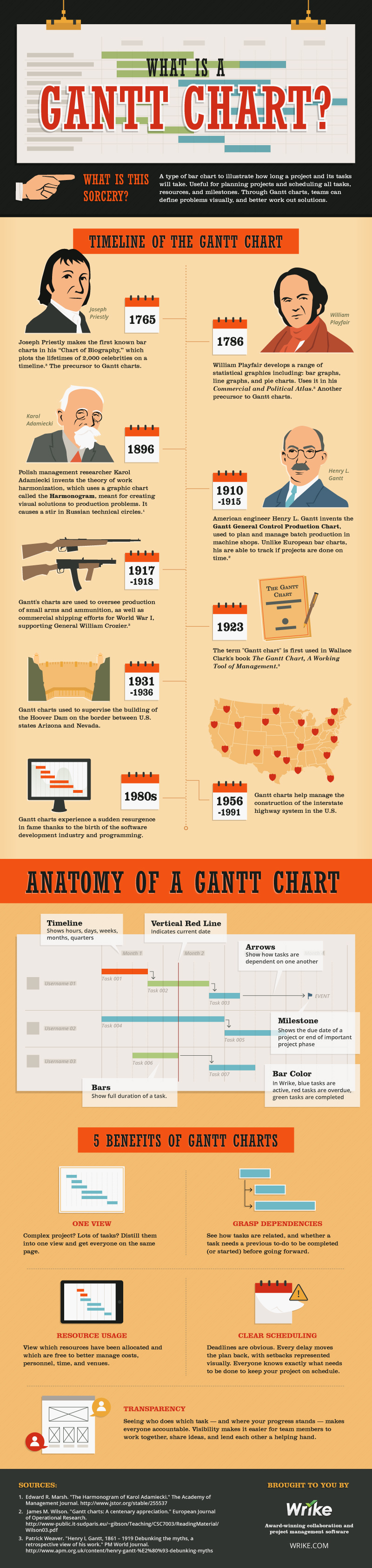
What is a Gantt Chart for Project Management?


What is a Gantt Chart for Project Management?
Infographic brought to you by Wrike - Gantt Chart For Project Management

Wednesday, August 19, 2015

Six Things to Consider When Choosing a WordPress Theme


If you're considering building a website or a blog, you should definitely consider using WordPress as your base. Among other reasons, it's super customizable and user-friendly, and it doesn't cost much to set up and maintain. But when you're setting up your website, you'll find there are thousands and thousands of themes out there. You want to present yourself and your ideas in the best way possible, but how do you decide which of the themes you should use? Here are six things to keep in mind:

1. Purpose — The purpose of your blog will actually in some ways determine what theme you use—in part because your purpose will affect all the following things on this list. Before you start choosing your blog, make sure you know exactly what your plan is:  are you making a travel blog or a mom blog, a news site or a business site, or something else? If you have a clear idea of what you want, you'll find it's a lot easier to narrow down your options.

2. Utility — To start with, picture your website in your mind and think of what you're using it for. Will site visitors be reading articles? Viewing pictures? Doing online shopping? Interacting in discussions or forums? You need to choose a theme that will fit your purpose. Will it have columns? If so, how many? Will you be posting photos on it? How are they incorporated in the theme? Will you have ads? You don't need to know exactly what you want in a website, and you might find that when you're browsing themes, you change your initial plan. But if you can have a rough idea in mind, again, it'll narrow down your options right off the bat.

3. Appearance — The appearance of your website is really important. You can't judge a book by its cover, but a first glance at your website will have your viewers drawing all sorts of conclusions about whether the site is professional, relevant to them, easy to use, etc. Pay attention to the colors—of the background, header, text, links, and anything else on the page—and the font or fonts that are used and make sure you're sending the message you want to send. You might like a site that uses a handwriting font, but if you're making a website for a dental office, this may not be the best choice. When in doubt, check out other websites with similar purposes to yours and see what you like or dislike about them.

4. Ease of Modification — Even if you don't plan to make major changes to the template, you're going to need to at least input your own information. You want to make sure you pick a template that's going to be easy to work with—and if possible, pick one that you won't want to make major changes to. Make sure whatever you pick is compatible with the plugins that you want to use as well. It's kind of like shopping for clothes: if you had options, would you choose to buy a pair of pants that you knew you were going to have to hem shorter or have taken in or would you shop around some more? Shop around some and see what you can find for themes. Guaranteed, there's something out there that's perfect for you.

5. Ease of Use — This one might sound like a no-brainer, but you want to make sure you pick a site that's going to be easy for people to use. These days, you probably want something that's going to be easy to use both on a computer and on a mobile device. If your site is too frustrating or confusing or takes too long to load or is difficult to navigate, you're going to lose traffic. When in doubt, keep it simple and sleek.

6. Cost — You'll want to make sure you figure out your budget for your website before you get your heart set on a theme that's too expensive. Depending on what you're doing, it may make sense to shell out a little more money to create a more professional looking site. Or you might just decide that you really, really like a site that costs a little more. But there are also tons of free options for themes out there, and these might be worth exploring. Again, shop around and find the perfect site for you. If you find a nice theme that's out of your budget, see if you can't find a cheaper one that's similar to it before you bite the bullet and buy the more expensive site.

With these things in mind, you're sure to pick a theme and build a website that both does what you need and provides a pleasant experience for its viewers. WordPress isn't difficult to use—and with the right theme, you can easily build the website of your dreams!

Caroline, contributor from Secure Thoughts which provide information related to internet security 


Tuesday, August 18, 2015

Why Choose DroneFly?

Looking to purchase your first (or fifth) drone and wondering what online option is your best proverbial bet? Consider your search over--DroneFly offers the latest and best drones for sale, as well as a slew of awesome accessories among other cool products and services. Let’s check out what sets them apart from the competition, and why they’re the only drone company you’ll ever need: 

The Best and Most Awesome
When you shop for drones at DroneFly, you’ll gain access to the very best drones on the market. The company works with major drone brands so customers may browse for DJI options, 3D Robotics possibilities, Hubsan models, and much more. Find popular drones including DJI Phantom 2 Vision+, 3DR Iris+, Hubsan H107D X4, 3DR Solo, Phantom 3, and much more. Take a look at all their drone options here. The company also specializes in drone kits, allowing you to purchase not just a drone, but many of the accessories that go with it. 

Deals and Sales
DroneFly regularly features sales and deals of the day, as well as financing options. For example, you could purchase the 3DR Solo and finance it for as low as $42 a month. Nice, right? Filling out the financing form takes about 30 seconds. 

Video Tutorials
The drone experts at DroneFly offer video tutorials on the official DroneFly site so you may learn more about operating your chosen quad-copter. 

Installation and Repair Services
Installation services available through DroneFly include installation of the Zenmuse gimbal on the DJI Phantom, FPV, upgraded motors, and more. Repair services include those for Phantom models, with the company offering a service fee to cover you for time their techs spend on your quad-copter. 

These are just some of the reasons to go with DroneFly for all your drone needs! 

For more information about this exceptional company and the quad-copters they sell, please contact DroneFly today. 


Friday, June 5, 2015

Bulk Deleting Emails get rid off from 793 error


Trying to delete the emails in Gmail leading to 793 error ? don't worry here is a solution to clean all those hundreds of thousands of emails which are there from past year or less. To do this you need run a small script using Google Script.
First go to this link https://script.google.com/
Then start a script and copy paste the below script into Google script and save it (click the little clock button).
This is for your triggers. You can set up how frequently you want the script to run (I did mine for every minute).

function batchDeleteA() {
  var batchSize = 100 // Process up to 100 threads at once
  var threads = GmailApp.search('label:inbox older_than:2d');
  for (j = 0; j < threads.length; j+=batchSize) {
    GmailApp.moveThreadsToTrash(threads.slice(j, j+batchSize));
  }
}


Saturday, May 30, 2015

Why your business needs an employee monitoring software


Among all the contemporary challenges a business manager faces today, probably the greatest challenge is to increase the efficiency of the human resource. While many training program, seminars, and other related activities are conducted with the rationale of increasing the efficiency of the employees, research shows that cyber loafing (using the company’s internet connection for personal purposes) is a major distraction for employees, which greatly reduces the employees’ efficiency at work. Thus, it is very difficult for a manager to make sure that his subordinates are performing the tasks they are supposed to do rather than wasting time over the internet. 
To counter such a situation, IT developers have developed a dedicated application, termed as an employee monitoring application, which fully monitors the activities performed by the employees using their smartphones. Such applications are compatible with all the contemporary mobile operating systems, such as Android, iOS, Blackberry, and Windows.Some of the top reasons you should install an employee monitoring application on the smartphones of your employees are detailed below:

• Cyber loafing: 
Most of the corporateemployees consider it justified to use the business’ internet connection for their personal purposes such as socializing, personal emails, online dating and useless surfing. This not only decreases the efficiency of the employees, as the bulk of the time is spent in cyber loafing, but also has serious legal implications as well. Didn’t understand? Let me explain. Suppose any of your employees gets engaged in any illegal activity and the authorities are able to track the IP address of the internet connection. In such a situation, being the registered user of the internet connection,the business owner will be held responsible for the activity and may be sued in the court of law.So, to avoid any such situation or to track the one responsible for the illegal act, it is very essential to install a cell phone monitoring app on the smartphones of the employees.

• Financial scams:
Research analysis reveal the fact that many companies have recently signed up for fidelity insurance besides other insurance plans, the reason of which is the increasing number of financial frauds committed by the employees of the business corporations. Lately, many such cases have also been reported where many of the key employees of numerous business corporations were indeed the ‘physical spywares’ of the rival companies. Such disloyal employees first gain access to the confidential business information and then sell it to the rival against some personal benefit. This clearly, is a major threat to the business, and can only be dealt with an employee monitoring software.

Another thing worth mentioning here that it is illegal to monitor cell phone of somebody without his consent, so do not forget to mention this term in the employment contract that employees will be provided with such smartphones, which have an employee monitoring software installed on them. This will save you from any possible law suit by the employees, if they blame you for illegally spying on employees cell phones.

Some of the key functions performed by an employee monitoring software are listed below: 
• Monitoring incoming and outgoing phone calls
• Reading incoming and outgoing text messages. 
• Monitoring the email communication made by the employee.
• Accessing the contacts list and gallery items of the targeted smartphone. 
• Monitoring the pages surfed by the employee through his smartphone. 

Managing employees in the current business environment is one of the biggest tasks performed by the human resource managers. Employees tend to waste their time online and are often involved in inside jobs too. However, both of the said problems can be tackled with the help of an employee monitoring software, which dedicatedly keeps an eye on the activities performed by the employee through his smartphone. 

Author Bio:
Nicki is an author, Tech Experts and Relationship Advisor. Mostly she writes about Employee Monitoring legality. Her latest article why businesses need an employee monitoring software got wide social media attraction.

Thursday, May 28, 2015

Tech Toys You Never Knew Existed


Technology is moving faster than ever before. The following gadgets are just a few of the technological advancements you never knew or imagined existed. They range from the incredible, to the just plain funny. Get ready to be wowed by the wonder of the technological age!

DJI Phantom Drone

It's a bird, it's a plane, no, it's a Phantom Vision Plus drone. From Drone ETC comes an amazing little quadrocopter that comes in a variety of sizes ranging from camera sized, to tiny toy. It is so small you can control it with your smartphone, and it allows you capture beautiful HD footage. Now you can unleash your creativity by capturing million dollar looking shots and breath-taking vistas. The possibilities are literally limitless. 

Air2 Floating Bluetooth Speaker

Have you ever heard of a floating speaker? Well, we hadn't either until we saw the new Air 2. This gadget has a 10 meter transmission distance and can be controlled using your smartphone. It also has a free-hands calling option to get it back to you when you need it. This gadget uses magnets to float in the air. If you enjoy the futuristic look, then this device is definitely for you. 

Petcube

If you travel often, or if you just really miss your pet then this gadget is a must-have. It is a camera with two way audio and built in laser. You can see and talk to your pet, and play with them using the laser. There is also an option where the laser automatically plays with your pet for you when you get tired. If you feel guilty leaving your pet alone or if you travel often, this device will help you keep your pet close even when you're far. 

iRobot 

If you hate cleaning then give this gadget a try. Get all that dust out of your house by using this robotic mini vacuum cleaner in your home or office. The gadget detects all the furniture in the room and avoids hitting them. It also provides music connectivity. Sit back, relax, and let this robot do all the cleaning. 

Polaroid Socialmatic 14MP Instant Print Camera 

We are all familiar with the legendary Polaroid cameras of the 80’s. This is the new and improved digital version. It is a tablet and instant camera in one. You can connect it to wifi, read your email, or even a book. The camera allows you to take pictures at 14-megapixels, edit them and print as many copies as you want. It is also customized to fit your personality with the pictures you like coming up first. 

The future is now and new gadgets are popping up everywhere to make our lives easier, or to just make us happier. Check out these latest devices everyone is talking about. 

Sunday, February 8, 2015

Five iPhone Accessories to Up Your Geek Status


There is no shortage of options when it comes to iPhone accessories, but what about owners that are ready to up their geek status? Instead of those bland cases and ear buds, some want to know what science and nerd-based accessories they can use to make their smartphone more exciting than ever. If you own one of the hundreds of millions of iPhones that are in circulation, here is a look at five of the absolute best accessories for science and technology lovers. 
1. Portable Oscilloscope
With over 500 million iPhones having been sold, it is no wonder that some manufacturers have targeted electricians and hobbyists with a portable oscilloscope. These amazing devices have been used for many years to measure the change of voltage in an electrical charge for industries such as engineering, healthcare, and telecommunications, but they did come with the drawback of being large and unwieldy. A portable iPhone oscilloscope can carry out all of the same functions as a full-sized model, including the testing of digital and analog signals. 
2. Blood Pressure Cuff
High blood pressure can lead to a variety of serious health issues, including an increased risk of heart disease and heart attacks. Unfortunately, taking an accurate measurement typically had to be done with a personal cuff at home or in the doctor's office. An iPhone blood pressure cuff allows owners to test their blood pressure anywhere and at any time. As an added bonus, this accessory can send the results directly to a health app or stored for later analysis by the doctor.
3. Portable Telescope
With a simple attachment the iPhone can turn into a powerful telescope that has the ability to capture and save images from the sky. While these telescopes are around the same size as a traditional amateur telescope, they do come with some amazing advantages. The most useful feature is the ability to take real-time photos of the images that are seen as well as widen the picture so multiple users can enjoy the telescope at once. For those that already have a telescope that they use, a simple telescope-to-iPhone adapter can be purchased. 
4. A Digital Microscope
Just as an iPhone can easily be turned upwards as a telescope, a simple attachment can also turn it into a portable and high-def digital microscope. These devices are often no larger than a small flashlight and can take up to 5 megapixel pictures. They can be used by those within the healthcare industry to track information for patients or simply as a tool for the hobbyist looking for exciting new technology. Much like the telescope, simple adapters can also be purchased in order to capture images from a previously owned handheld digital microscope.
5. Solar Panel Case
With all of these accessories being used, even the iPhone's advanced lithium battery is going to need to be recharged frequently. Instead of waiting to get back to the car or looking for a wall outlet, a solar panel case is a great way to keep the smartphone running with nothing more than a little sunlight. While solar panel cases will not charge as quickly as wall chargers, they are more efficient than ever and add no more weight or size to an iPhone than a typical impact-resistant case. For a full charge from 0 to 100 percent, owners can expect a charge time of 3 to 4 hours depending on the amount of sunlight, apps that are currently on, and the age of the phone. 

The sky is the limit when it comes to some of the amazing iPhone accessories that are currently available today. These five products are only the beginning for iPhone owners that are ready to reaffirm their status as a proud geek.

Saturday, January 24, 2015

Whatsapp Web - Now you can access Whatsapp on your PC

Now you can access WhatsApp Web version officially in your computer without using any Emulators or third party software

Let see how it would be

Steps:
- Update your Whatsapp to latest version
- Goto www.web.whatsapp.com in your PC(currently works only in Chrome browser)

- Scan the QR code using Whatsapp Web which is found in Whatsapp Menu (No need to download/use third-party QR Code scanner)

- After completion of the scan Whatsapp will open in your Chrome browser. That's it now you can chat with your whatsapp friends through browser

Note: For best performance use Wifi/3G/4G in your smartphone

For Video Demo visit Whatsapp Web 

Tuesday, January 6, 2015

Housing.com: Meet The New Property Search App

Are you currently browsing the application store in hopes of finding a powerful mobile application, which will help you search for properties in India? The truth of the matter is that there are numerous websites and apps, which can offer these services. Much like the number of properties in India, this can make it difficult to find the right one for your specific preferences. While it will all come down to personal tastes and preferences, it is a wonderful idea to experiment with each in order to find the one that suits your needs. Of course, you might want to download a free CommonFloor alternative now and experiment. If this is something you’re thinking about doing, you should definitely check out the amazing, new Housing.com App.

About the App
The Housing.com App is developed by the same team, which launched the ultra success, award-winning website, Housing.com. Although the application is a small download, it comes with some very powerful features and is completely flexible. In order to download the app, you can find the download link through your application store or through the Housing.com website. Anyone with an Android of iOS device can download and use the application immediately, since it can be downloaded for free. Unlike many other similar apps, this one comes with no ads or adverts to get in your way.

Customize Everything 
When it comes to the flexibility of the application, you will find that everything in the app can be customized to fit your preference. As you can see in the picture above, the map, aerial view of properties can be altered, by using the local feature. With this button, you will be able to change the specific buildings and facilities that the map displays. On the other hand, there is a filter option, which allows you to completely redefine your search parameters, in order to find a specific property, which will certainly fit your needs. On the other hand, you can also change the list of the properties, in order to sort them in a specific manner. You can sort them by price or distance.

Always-Available Menu
When it comes to it, you might want to consider switching your search options. On the other hand, you might want to think about looking for an agent. In order to do this, you will need to access the app’s menu. Thankfully, it is possible to access the menu at all times. The menu can always be opened, by using the small menu button in the upper corner. Be sure to check out this menu, as soon as you begin exploring the application. You will also be able to access your saved properties from this menu. If you wish to speak with the app’s developers, you will be able to do so from the menu.

Conclusion
When all is said and done, the Housing.com App is a powerful property search app, which is definitely a top contender for the Common Floor App. Since it is free of ads, it is likely your best bet for finding properties, within the country of India.

Monday, August 25, 2014

Mobile Photography and Tips to Improve It

Admit it! You love it when the mobile pictures you share online gets plenty of likes and comments. It gives you a sense of happiness to see the image you took, getting a lot of attention. But with the limited filters and settings in photo editing applications like Instagram, expect your pictures to look exactly like other people's photos.
If you want to improve your pictures and make them stand out, here are few tips that you should follow:

Look At Your Subject in Different Perspective
Do not limit yourself on what your eyes are making you see. Look beyond the linear perspective and experiment on angles and foreground. There are various perceptive composition to help images look entirely different. The most common perspectives are the birds eye view and the worms eye. The former being taken in high vantage point while the latter, taken in a low point of view. There are also overlapped perspective where subjects from the foreground partially covers the background subject. This creates a sense of depth, which shows relative distance among the subjects. Playing with angles help your photos dynamic and pleasant to look at.

Know The Perfect Filter
Instagram filters create a retro-analog effect to you digital images. Usually, people use a trial and error process in choosing which filter to use but it is time consuming. You have to be familiar with filters. Here are few:
•Hefe: Slight vignette edge that improves contrast and saturation. Makes color pop in an already vibrant subject.
•Valencia: High retro effect that makes an eerie feel. It washes out and overexpose images to create antique look to the subject.
•Toaster: High saturation filter with burnt center emphasizing vignette edges. This is a dramatic filter that pushes the attention to the central part of the image.
•X Pro II: A very versatile filter that suits indoor and outdoor subject, whether portrait or landscape. It also make colors pop out to give a Photoshop effect.

Be Creative with Props
You should add spice to your subjects by adding props like flowers, boxes, shells and figurines. Subjects with props get more attention than the bare ones that is why shopping stores always adorn their window displays with props. Play and experiment with these materials to improve the composition of your images.

Mind the Light
Everyone knows that bad light ruins an image. That is why you have to know where best to photograph your subject. Here are few points to note:

•Indoors, open as much light as possible, but be aware of harsh shadows because it can ruin the composition. You can use reflectors to minimize shadows.
•Outdoors, you have to avoid too much light. It basks your frame into too much white light that might remove important contrasts.
•Camera phone lenses are prone to sun flares. Sun flares can ruin your photos, but you can use it to you advantage by experimenting with it.

Experiment With Lenses
Be more creative by adding clip-on lenses on your phone. It can be wide-angle, close-up or fisheye lens. Fisheye lens is an ultra wide lens that makes visual distortion to your photos. Wide angles are perfect for taking landscapes while close up lens is good in capturing details. With lenses you can create great depth-of-field that you can only achieve through professional cameras.

Try New Photo Editing Tools
If you cannot achieve your desired effect in Instagram, you can export your photos and open it in a different editing application before posting it in Instagram. There are many great photo applications for android and iOS phones. Here are few apps that you can try:

•Camera 360: An easy to use photo editing application that offers creative filters. Unlike Instagram, camera 360 has filters that gives more than the retro style. You can play with saturation, glow and soften filters. You can also improve the lighting of under or over exposed pictures.
•Camera Zoom FXP: This photo app makes your phone camera more powerful. Aside from helpful grids to compose your images properly, this app helps you take in stable-shot mode to avoid blurry images. It also has voice activated shooting mode.
•Pixler Express: This is a mobile version of the widely popular Photoshop alternative. It basically runs the same way as Instagram but it feature more interesting filters. It also has a very user friendly interface to easily navigate the application.

These are the few tips that you can do to improve your photos and make them stick out from the usual retro images you see online. Remember expressing creativity should never be limited to filters, you have to think outside the box to make every photos you share online, memorable.

Author's Bio:
Maddy is a global writer and blogger, she is currently writing for Millennials in Manila, a web magazine about life, career, culture, entertainment and more. 

Thunderbolt Firmware Update Headed Mac Users Way

Everyone knows how important it is to keep themselves in touch with every update that gets released, whether it be for their mobile or PC operating system. With the advancement of malware and spyware, it seems impossible to have a device which functions without causing issues unless one is properly updated and on top of the vulnerabilities that hackers and their virus brigade manage to get the best of.

And speaking of updates, Apple has come out with a recent update for Mac systems, which have ever so slowly been losing their status as super safe computer systems. Overall Apple has always managed to keep the security side of things tight (too tight according to some) but lately it’s Mac OS has been coming under fire for not being able to stand the test of hard drive extraction and usage. Though Mac users hardly complain of Mac spy software or other such standard issues, this particular liability has needed to be addressed and the update that will do so is finally here.

The firmware update is for the Thunderbolt controllers in Mac systems. The entire update is designed to deal with the issues popping up with individuals using Target Disk Mode to mount a Mac’s internal hard drive onto another system or external drive. This method is mostly used for trouble shooting the hard drive function or whenever users need to migrate their data to a new Mac system but it can also potentially leak your information if in the wrong hands. Anyone with physical access to your system and a root account can easily go through your emails and whatever else is stored. Of course this is a major threat to both user security and privacy.

This particular update isn’t a heavy one and is simply 1.22MB; it can be either downloaded through Apple’s Support Downloads website or then run manually or you can run the Software Update Service in OS X in the Apple menu. Despite its small size, this particular update comes with firmware updates for a number of systems with this port including the iMac, MacBook, and Mac Mini systems. So far there hasn’t been any word of any specific system requirements which are needed and hence one can assume that it would be applicable to anyone whose device sports a Thunderbolt port.

For users who are attempting to install this update, simply make sure that you are indeed following the onscreen instructions by Apple and there is no chance of disruption of your power supply. Updating firmware is actually a fragile process and if gone even slightly wrong, it can end up corrupting your system and leaving it useless. Of course Apple’s release is a part of advanced technology and this modern firmware updating method seems secure and safe from corruption over the last few years.

What the update does require is the OS X 10.8.3 and as with all updates and installations, you will need to restart your system for installation. Now having read up on this, go get your update ASAP, waiting around to update is never a smart idea.

Katherine Kayden is a writer for Stealthmate and loves to blog about latest trends in the tech world and further review them. She can be contacted @ katkay00@gmail.com. 

Sunday, June 1, 2014

Building a Brand: Learn from These Successful Tech Businesses

For aspiring entrepreneurs and business owners today, learning from leading tech firms can help any business become more successful. By learning from those who have managed to defeat all odds, strategies for success can be developed that can be applied to any industry. This article will outline several successful tech companies that entrepreneurs can learn from.

Google
Originally started as a Stanford research project by Sergey Brin and Larry Page, Google has grown to be a massive enterprise today. In almost everything it does, it seeks to innovate and follow its slogan, "Don't be evil". From search engine technology, to online analytics, Google has proven its ability to add value to customers through outstanding innovation. After acquiring YouTube for $1 billion, Google has since turned YouTube into a cornerstone of the internet. Google has also proven its abilities to enter an existing market and be successful with Google Plus, which in just a few years has grown to almost surpass leading social networks.

Apple
Apple is the ultimate success story for entrepreneurs who start from nothing. Launched from the garage of Steve Jobs, the company grew to become one of the leading software and hardware innovators for personal computers in the 1980s. While the company declined in the 1990s, it rebounded with unprecedented success with successful offerings such as the iPod, iPad, and iPhone. Today, Apple is valued at nearly $1 trillion and is one of the most profitable companies in the world. Their secret to success is simply to never stop innovating.

Microsoft
When Apple declined, it was because Microsoft took its place. When Microsoft entered the operating system market in the late 1970s, it had the end in mind the entire time. By the 1990s, Microsoft had successfully made Windows the essential operating system for any individual or business wishing to use a personal computer. To this day, Microsoft has continued to shine by following up on its victories with operating systems that are even further improved.

In the last decade, a wide variety of companies have emerged and made it big in the digital world. Even if your company has less to do with computers than these examples, you can use their advice for innovation, constant creativity and determination to get your name out there. According to the New Jersey Institute of Technology, an MBA in management information systems online can be a useful tool for any new company. Use the skills you already possess and give yourself a boost with advertising and invention. 

Tuesday, May 27, 2014

What Makes An SEO Website Poor Quality And Lower Ranked

Search Engine Optimization is very much important in these days. Without the proper SEO, your site is not going to be optimized and ranked higher in the SERP’s (Search Engine Result Pages). There are different kinds of SEO mistakes that persons make, which results in the lower rank in the popular search engines, even banned by them. Mistakes are made because of the presence of different kinds of publishers, with enormously different levels of approaches and knowledge. 

Different people, engaged in SEO
These falls into four different categories: People, who do not truly get familiar with the SEO, so they do not get in touch with the fact that they must accomplish something about it. Persons, who have worse knowledge and information about SEO, they accomplish the wrong thing. Individuals, who engage in SEO and deliberately, violate the guidelines of the Google Webmaster. People, who realize SEO and try to abide by the guidelines of the Google Webmaster. All of them make efforts on their own to improve the SEO aspect of any website, according to their skills and knowledge.  All the things lead to the great confusion and mistakes. Have a look at some common mistakes made by people, mentioned below:

Fail to build up your CMS
There are a lot of e-commerce or content management systems, which can be created SEO friendly. Though, all of them need some configuration level, incorporating Magento, Drupal, WordPress, Joomla, ATG and many others. Descriptions and custom titles for every page are an ordinary configuration necessity for all of these systems, but there are frequently many more components also. These can incorporate creating a site maps file, removing duplicate content, personalizing URL’s for search engine easiness, and much more. You need to ensure to acquire information from your content management system company on what the SEO requirements for configuration are for their platforms. 

Having duplicate content 
This issue has been around always, and frequently effects from failing to construct your CMS or sloppy coding, or only easily not understanding that dealing with it is essential. Duplicate content is defined as including the same content, or almost the same content, come into view on 2 different URL’s. This kind of issue can cause search engines in order to rank your website lower, and hence, move you less traffic. 

Having thin content
Thin content is defined as pages, which simply do not include lots of context on them, or websites with a lot of pages, which are not that dissimilar from one another, although, these are not considered duplicates. A lot of websites can include this issue. This is a fabricated example of what could be reflected on a thin content web page on an ecommerce website. You can hire Miami SEO services to get rid of thin content issues. 
This leads to make a website of poor quality. Certainly, this is quite probably to take place. More frequently than not it is due to the fact that a publisher has understood enough about Search Engine Optimization to learn that including pages for dissimilar topics can assist in attracting more traffic, but they do not place adequate effort into the web pages they insert to make them valuable and unique. 

Author Bio
Claudia is a professional writer, who has a keen interest in the latest technology aspects such as Internet marketing Miami and many others. She has written a lot of creative and unique articles and blog posts on these topics.