
Provides a preview pane to read mail right next to your list of conversations, making mail reading faster and adding more context.
1. Sign-in into your Gmail account.
2. Goto Gmail Settings –> Click Labs section.
3. Search for Preview Pane.

4. Click on Enable radio button and hit Save Changes.
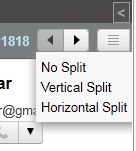
5. Once you’ve enabled it, there will be a new button on top of the email list which will enable you to activate the vertical split or horizontal split and switch between the full list view and the split view.
6. That’s it. The currently selected message will be displayed in full to the right or below the email list.
1. Sign-in into your Gmail account.
2. Goto Gmail Settings –> Click Labs section.
3. Search for Preview Pane.

4. Click on Enable radio button and hit Save Changes.
5. Once you’ve enabled it, there will be a new button on top of the email list which will enable you to activate the vertical split or horizontal split and switch between the full list view and the split view.
6. That’s it. The currently selected message will be displayed in full to the right or below the email list.


